

So - I'm not super artsy - but I want to try to, what's the word... digital draw? Like isn't there an iPad app ... pro something? But I don't have an iPad 😉
Any advise for a newbie? What are good apps/platforms to use?
So - I'm not super artsy - but I want to try to, what's the word... digital draw? Like isn't there an iPad app ... pro something? But I don't have an iPad 😉
Any advise for a newbie? What are good apps/platforms to use?
I'm guessing you're looking to start on your computer or laptop - I'd recommend getting a drawing tablet. Speaking from experience, it's impossible to make something nice with a mouse. The only brand I've ever had in terms of drawing tablets is Waccom, but I've always been happy with their products and they last a long time.
But I ain't got a hammer / And I ain't got a pencil / And I ain't got a lasso / So I'm doing it the hard way / Like a post post-modern man
I'm guessing you're looking to start on your computer or laptop - I'd recommend getting a drawing tablet. Speaking from experience, it's impossible to make something nice with a mouse. The only brand I've ever had in terms of drawing tablets is Waccom, but I've always been happy with their products and they last a long time.
I looked on Amazon and there are some cheap ones on there I thought about getting - I love seeing everyones art on here and I want to make things too but maybe I am not ready to try to start yet... I have been picking up so many 'hobbys' lately and dumping them a few days later.... like rock wrapping... i bought a kit off amazon and now it just sits in the closet
I looked on Amazon and there are some cheap ones on there I thought about getting - I love seeing everyones art on here and I want to make things too but maybe I am not ready to try to start yet... I have been picking up so many 'hobbys' lately and dumping them a few days later.... like rock wrapping... i bought a kit off amazon and now it just sits in the closet
I totally get that! Earlier in the year I was convinced that I was going to fall in love with doll restoration, bought a bunch of supplies, and now the project I began is collecting dust. 😆 I feel like digital drawing is a easy hobby to start, though. I guess it all depends on how much you draw in your day to day life? I can't imagine someone who doesn't draw regularly really getting into digital art.
But I ain't got a hammer / And I ain't got a pencil / And I ain't got a lasso / So I'm doing it the hard way / Like a post post-modern man
I looked on Amazon and there are some cheap ones on there I thought about getting - I love seeing everyones art on here and I want to make things too but maybe I am not ready to try to start yet... I have been picking up so many 'hobbys' lately and dumping them a few days later.... like rock wrapping... i bought a kit off amazon and now it just sits in the closet
I looked on Amazon and there are some cheap ones on there I thought about getting - I love seeing everyones art on here and I want to make things too but maybe I am not ready to try to start yet... I have been picking up so many 'hobbys' lately and dumping them a few days later.... like rock wrapping... i bought a kit off amazon and now it just sits in the closet
I looked on Amazon and there are some cheap ones on there I thought about getting - I love seeing everyones art on here and I want to make things too but maybe I am not ready to try to start yet... I have been picking up so many 'hobbys' lately and dumping them a few days later.... like rock wrapping... i bought a kit off amazon and now it just sits in the closet
You probably got ADHD like most of us. Interests come and go without a second thought. Honestly? Keep picking them up and keep dropping them. Society raises us to think we have to have everything figured out in our 20s when that's the absolute worst time to do so. It's the decade of experimentation (your entire life is really). So go nuts!
I'm sitting next to about 20 yards of minky, a sewing machine and maybe $400 in plushie making material that I started in March and ended in May. I might come back to it, I might not. There's boxes of woodworking materials and half finished sculptures, god knows how many canvases, easels and paintbrushes, hundreds of empty sketchbooks and journals. I've changed careers entirely at random, with the longest being as a freelance illustrator for 9 years, and this year's trend seems to be to drop it like a rock and pursue UI/UX.
The Tablet
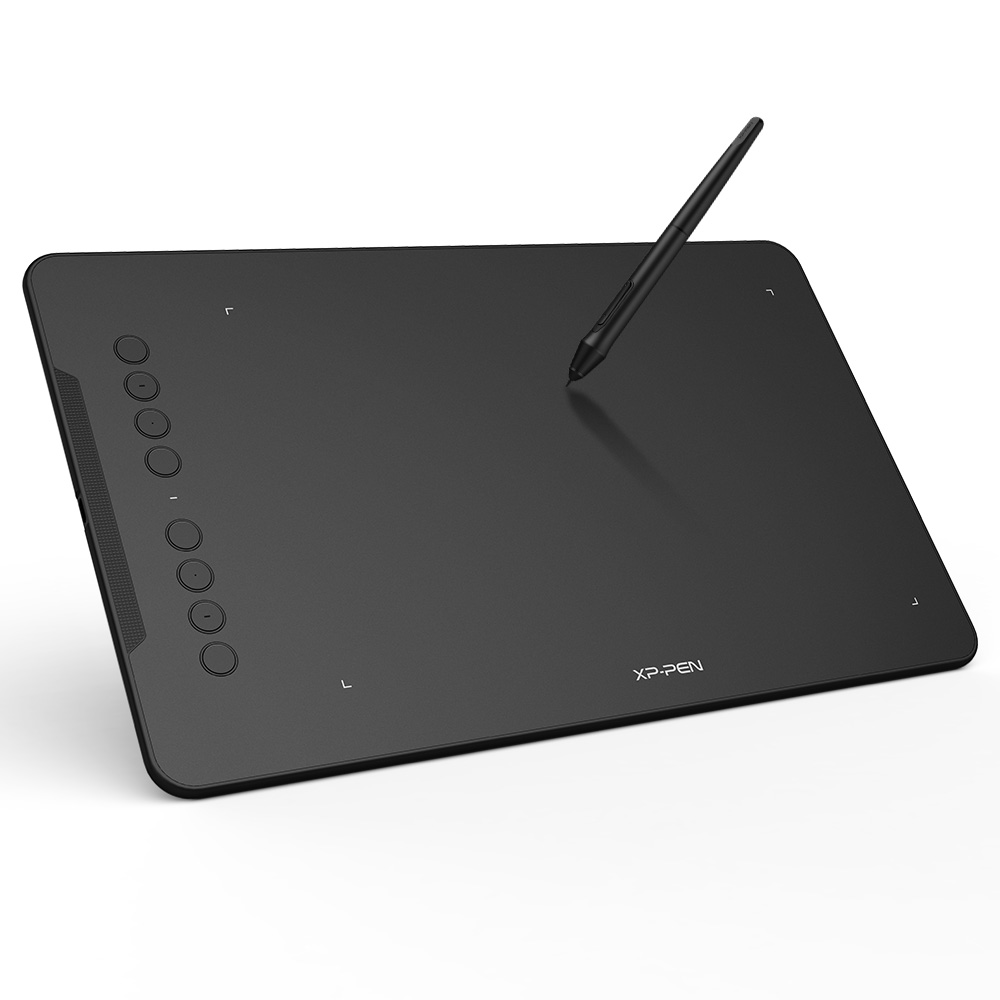
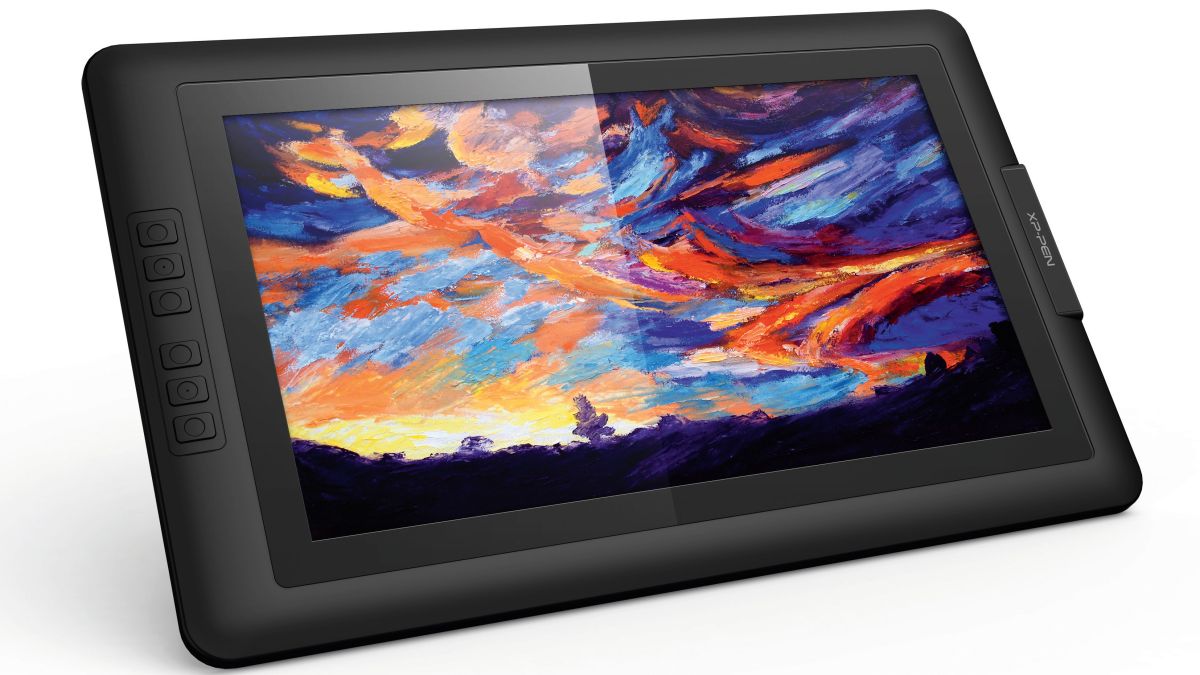
The first thing you usually want to grab is a tablet. There's a wealth of them online (I highly advise staying AWAY from Wacom and picking up from XP-Pen, Huion, Monoprice, and other less known purchases. Plenty of folks on Youtube review these!) and they come in all sizes. When shopping, keep a measuring tape on hand to measure if the screen size you're getting is right for your hands and arms. There are two types of tablets: Regular tablets and Monitor tablets. A regular tablet does not have a screen, meaning you need to learn hand-eye coordination when you begin drawing with it. For some, this can be their downfall as it does take a few hours to get a grasp on. Monitor tablets on the other hand, function as their own monitor with a screen, giving the impression you're drawing on pen and paper. Monitor Tablets tend to be more expensive than regular tablets (you can find regular tablets as low as $50, while monitor tablets tend to start around $200. Like I said before: Avoid Wacom. They price by their brand name rather by the quality of their product, and for the price of a medium sized regular tablet of yours, you could be buying a huge monitor tablet from a place like XP-Pen. (I use the XP-Pen Artist Pro 12, and I have a XP-Pen 15.6 in my closet depending on what size I need where). For comparison, a Wacom One, which is a 13 inch screen, goes for $400. The XP-Pen Artist Pro 12, with a 12 inch screen, goes for $200. Half the price, for the same size, and the same quality. In addition, Wacom charges anywhere from $6-10 for 5-10 pen nibs (these dull down over time as you use them. XP-Pen charges that same $10 for a pack of One Hundred.
Health
The primary cause of carpal tunnel and tendonitis that ends a digital artist's life is the way they learn to draw in comparison to traditional artists on pen and paper. Digital artists, due to often buying our first tablet in a small size, grow accustomed to drawing with our wrist, versus our elbows. If you get a tablet, practice for 15 minutes every single day, be it on circles or lines, eyeballs or some other shape. Focus on only moving your arm, not your wrists. It will be difficult, but learning any new craft is, and this is an early fundamental that will prevent years of pain down the line. My wife and I have gotten tendonitis in our arms 2-3 times a year when we stop practicing and default back to using our wrists. Also get into the habit of practicing hand, wrist and arm stretches prior to drawing. There's plenty of tutorials from artists and animators alike on Youtube that show how to do this!
I cannot stress this enough. This year, my second wife had to put her webcomic on hold for the first time since starting it 8 years ago. She damaged her wrist to the point she was sobbing if she drew, and is now in a brace and on intense pain meds. Her output went from 2-3 full comic pages a day to 0, and can only do minor sketches right now. She relies on the other two of us to do the coloring, dialogue, and advertising for the comic. Prior, she was doing everything. If you've ever heard of Loish, she's a very popular artist who also suffers from severe carpal tunnel. Her pieces are gorgeous, but she can't work often due to that pain unless she's given an extremely lax schedule.
Software
There is a wealth of drawing software out there. Free ones include SAI (Personal preference), Medibang and FireAlpaca. If you don't already have Adobe Photoshop, try to ignore it. You can get it for $10/m, but if this is your first dive into art with any sort of serious mindset, you're gonna want a free program, or Clip Studio Paint, which is one-time priced software (they go on sale frequently for 50% off, and anyone can tell you it's the way to go instead of Adobe.) If you decide to get into animation, Clip Studio also covers that for you! Clip is what maybe 90% of my friends use. If you have a product like an iPad or a Samsung Galaxy Tab, you can get most of these programs for free on them as well. Clip Studio comes as a subscription, but for a FRACTION of the price Adobe will charge you. ($120 a year for Adobe, $25 a year for Clip Studio. See what I mean?)
The Art of Drawing Daily
Somewhere in my Google Drive I wrote an article on how to achieve learning to draw every day as stress-free as possible, be you a new artist entirely, or someone new to digital artwork, or someone who still wants to traditionally draw. If you decide to pursue art, feel free to hit me up and I'd be more than happy to dig this up for you and send it your way to see if it'd help you! As for the art itself? Youtube, Deviantart, Pinterest, Artstation and a plethora of other sites give you access to tons of video and image tutorials. I personally enjoy watching speedpaints on Youtube as I get to see and mimick how other artists pull off certain techniques. Despite drawing for my entire life, and professionally for 9, I still learn something new every time. Right now, I HIGHLY HIGHLY advise hitting up Artstation. The Artstation Learning program is currently completely free, whereas usually, individual classes can cost upwards of $200+ per, depending on the class you decide on. They're all at your own pace, and you've got so many places to choose from. Plenty of starter classes for digital artists as well!
I apparently hit the word limit in Sensipets so I guess WE MOVIN TO ROUND 2
~ Come hang out 'cause you're out of your mind ~
~ You're working so damn hard, you forgot what you like ~
🏳️⚧️🐕🦺
You probably got ADHD like most of us. Interests come and go without a second thought. Honestly? Keep picking them up and keep dropping them. Society raises us to think we have to have everything figured out in our 20s when that's the absolute worst time to do so. It's the decade of experimentation (your entire life is really). So go nuts!
I'm sitting next to about 20 yards of minky, a sewing machine and maybe $400 in plushie making material that I started in March and ended in May. I might come back to it, I might not. There's boxes of woodworking materials and half finished sculptures, god knows how many canvases, easels and paintbrushes, hundreds of empty sketchbooks and journals. I've changed careers entirely at random, with the longest being as a freelance illustrator for 9 years, and this year's trend seems to be to drop it like a rock and pursue UI/UX.
The Tablet
The first thing you usually want to grab is a tablet. There's a wealth of them online (I highly advise staying AWAY from Wacom and picking up from XP-Pen, Huion, Monoprice, and other less known purchases. Plenty of folks on Youtube review these!) and they come in all sizes. When shopping, keep a measuring tape on hand to measure if the screen size you're getting is right for your hands and arms. There are two types of tablets: Regular tablets and Monitor tablets. A regular tablet does not have a screen, meaning you need to learn hand-eye coordination when you begin drawing with it. For some, this can be their downfall as it does take a few hours to get a grasp on. Monitor tablets on the other hand, function as their own monitor with a screen, giving the impression you're drawing on pen and paper. Monitor Tablets tend to be more expensive than regular tablets (you can find regular tablets as low as $50, while monitor tablets tend to start around $200. Like I said before: Avoid Wacom. They price by their brand name rather by the quality of their product, and for the price of a medium sized regular tablet of yours, you could be buying a huge monitor tablet from a place like XP-Pen. (I use the XP-Pen Artist Pro 12, and I have a XP-Pen 15.6 in my closet depending on what size I need where). For comparison, a Wacom One, which is a 13 inch screen, goes for $400. The XP-Pen Artist Pro 12, with a 12 inch screen, goes for $200. Half the price, for the same size, and the same quality. In addition, Wacom charges anywhere from $6-10 for 5-10 pen nibs (these dull down over time as you use them. XP-Pen charges that same $10 for a pack of One Hundred.
Health
The primary cause of carpal tunnel and tendonitis that ends a digital artist's life is the way they learn to draw in comparison to traditional artists on pen and paper. Digital artists, due to often buying our first tablet in a small size, grow accustomed to drawing with our wrist, versus our elbows. If you get a tablet, practice for 15 minutes every single day, be it on circles or lines, eyeballs or some other shape. Focus on only moving your arm, not your wrists. It will be difficult, but learning any new craft is, and this is an early fundamental that will prevent years of pain down the line. My wife and I have gotten tendonitis in our arms 2-3 times a year when we stop practicing and default back to using our wrists. Also get into the habit of practicing hand, wrist and arm stretches prior to drawing. There's plenty of tutorials from artists and animators alike on Youtube that show how to do this!
Software
There is a wealth of drawing software out there. Free ones include SAI (Personal preference), Medibang and FireAlpaca. If you don't already have Adobe Photoshop, try to ignore it. You can get it for $10/m, but if this is your first dive into art with any sort of serious mindset, you're gonna want a free program, or Clip Studio Paint, which is one-time priced software (they go on sale frequently for 50% off, and anyone can tell you it's the way to go instead of Adobe.) If you decide to get into animation, Clip Studio also covers that for you! Clip is what maybe 90% of my friends use. If you have a product like an iPad or a Samsung Galaxy Tab, you can get most of these programs for free on them as well. Clip Studio becomes a subscription, but for a FRACTION of the price Adobe will charge you. ($120 a year for Adobe, $25 a year for Clip Studio. See what I mean?)
The Art of Drawing Daily
Somewhere in my Google Drive I wrote an article on how to achieve learning to draw every day as stressfully as possible, be you a new artist entirely, or someone new to digital artwork, or someone who still wants to traditionally draw. If you decide to pursue art, feel free to hit me up and I'd be more than happy to dig this up for you and send it your way to see if it'd help you! As for the art itself? Youtube, Deviantart, Pinterest, Artstation and a plethora of other sites give you access to tons of video and image tutorials. I personally enjoy watching speedpaints on Youtube as I get to see and mimick how other artists pull off certain techniques. Despite drawing for my entire life, and professionally for 9, I still learn something new every time. Right now, I HIGHLY HIGHLY advise hitting up Artstation. The Artstation Learning program is currently completely free, whereas usually, individual classes can cost upwards of $200+ per, depending on the class you decide on. They're all at your own pace, and you've got so many places to choose from. Plenty of starter classes for digital artists as well!
I apparently hit the word limit in Sensipets so I guess WE MOVIN TO ROUND 2
Final Notes:
Becoming an artist is difficult, but so is anything else you dive into as I'm sure you've found out already. When I started, I was drawing maybe once a month if that, sometimes once every 6 months. These days, I draw maybe 6-8 times a day, be it on one image, or 6-8 of those too. And sometimes I have bad years, where I won't draw for months at a time, or very sparingly (for 2020, I didn't start having any completed pieces until August. Before that, my folder is dead.) It takes time, and it takes a lot of self-motivation, but anyone can do it. Whether or not they will do it well depends on just how much of it they'd like to do, and how much they want to learn with every piece!
And an important and final note: Save all that you do. This is hard for new artists to grasp. We think of our work early on as being terrible (or all of our work period), and so we don't want to see it. But your awful work makes you create your best work. Not just because you have to get through 1,000 failures for the 1 success, but because looking back on your old artwork shows you just how much you've improved in the time between, and it is vital in keeping your motivation. You are the only one who will see the full depth of your artwork. Others will praise you or degrade you or outright ignore you, but only you will be able to truly tell where you need to go.
My process is what's below. Every year, I create a new folder, and then 12 folders inside, one for each month. Every completed drawing I do goes in here (the ones I consider finished). From 2013 to today, I have completed 1,983 pieces. At the end of every year, I do one of those "Summary of Art" pieces, and choose the 12 best ones I did for each month. This is a nice summary that I can glance back at instead of opening all of those folders.
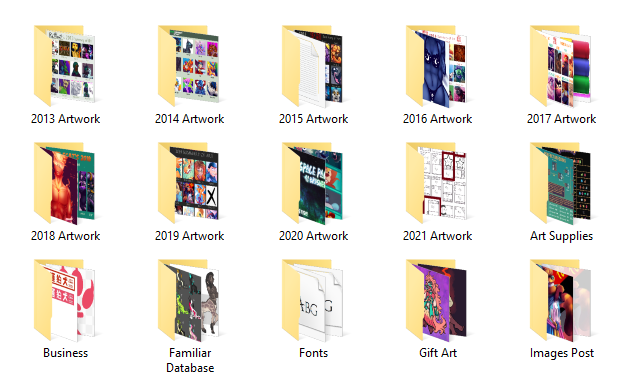
It seems like a lot to accomplish, and it is! But those 1,983 pieces have way more behind them. I also keep a Raw Files folder, which contains all of the editable files, set up by month and year like the finished. From 2013 to today, there's 4,183. You see what I mean about there being 1,000 failures to 1 success. Early artists are baffled at the idea of an artist like me not posting all of their artwork, especially since digital artists today focus a lot on creating an audience alongside learning (Don't. Just don't. Learn first, scream and sell later. You'll thank yourself years down the line when your mental health takes a drop and you need the pick me up.), but you'll also learn that not everything needs to be posted or seen as finished. Not everything needs to be polished, not everything needs to be thought about. Most of the time it's less that and more, we just ain't got time to finish every single piece we start, especially when new ideas and concepts are kicking down our door, screaming for attention XD.
But uh, yeah, that's about it o.o Hope you like art if you go for it and feel free to hit me up any time you'd like if you want that Drawing Daily article :o
~ Come hang out 'cause you're out of your mind ~
~ You're working so damn hard, you forgot what you like ~
🏳️⚧️🐕🦺
Sign in to reply.